In today’s digital landscape, where cyber threats and unwanted messages are pervasive, maintaining a trustworthy email presence is crucial for any business or organization. One of the most effective ways to achieve this is by implementing DomainKeys Identified Mail (DKIM), a technology designed to authenticate email senders and protect recipients from malicious or fraudulent emails. This article provides a comprehensive, expert-driven guide on DKIM record setup, with a particular focus on practical implementation and management through Mimecast—a widely used email security platform. Whether you are an IT administrator, business owner, or email manager, this Mimecast guide will equip you with the knowledge and confidence to improve your email reputation and reduce spam.
The Role of DKIM in Modern Email Security
Email remains a primary communication tool, both internally and externally, for organizations worldwide. However, with its widespread adoption comes an increased risk of spam, phishing, and spoofing attacks. DKIM is an industry-standard authentication method that helps combat these threats.
DKIM works by allowing a sender to attach a digital signature to each outgoing email. This signature is linked to the domain’s DNS records, enabling receiving mail servers to verify the authenticity of the sender and the integrity of the message. If the signature is valid, the recipient’s server can trust that the email genuinely comes from the claimed domain and has not been altered in transit.
Implementing DKIM not only helps prevent unauthorized use of your domain but also improves your overall email deliverability and reduces the likelihood of your legitimate messages being marked as spam. For organizations using Mimecast, understanding how to configure and maintain DKIM records is essential to leveraging its full security potential.
Why Email Reputation Matters
Email reputation is a measure of how trustworthy your domain appears to email service providers and spam filters. Domains with a strong reputation are less likely to have their messages sent to the spam folder. Conversely, domains with poor reputations may experience delayed or dropped communications, damaging customer relationships and business operations.
Several factors influence email reputation, including sending practices, spam complaints, and the presence of authentication protocols like DKIM, SPF, and DMARC. By setting up DKIM correctly, you demonstrate to receiving servers that you are a legitimate sender, which directly contributes to a positive reputation.
For organizations that use Mimecast to secure their email infrastructure, this Mimecast guide emphasizes that DKIM configuration is a foundational step for maintaining a healthy sender reputation and fostering trust among recipients.
Step-by-Step DKIM Record Setup
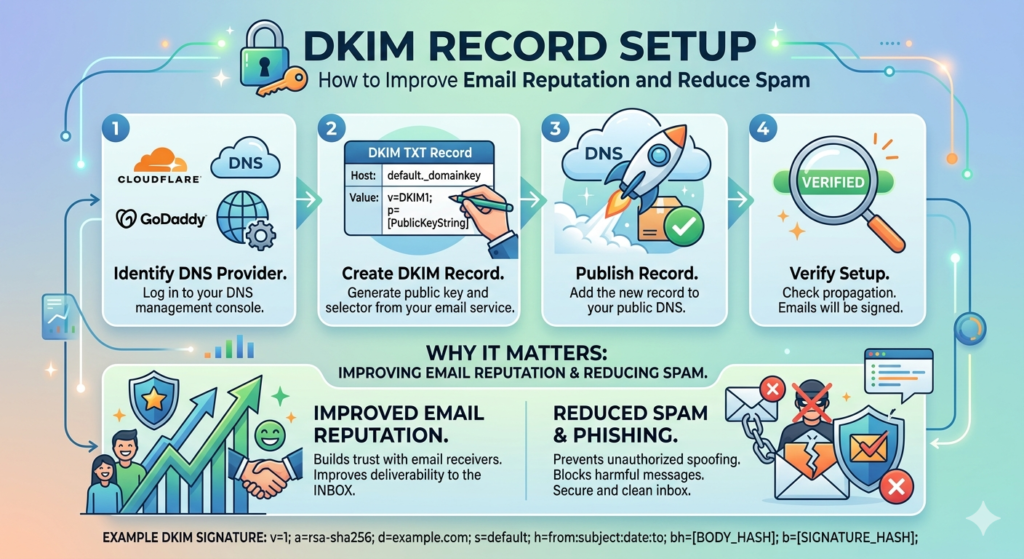
Setting up DKIM can appear daunting, especially for those unfamiliar with DNS records or email authentication protocols. However, with the right approach and a detailed Mimecast guide, the process becomes manageable and straightforward. Below are the core steps to follow for effective DKIM implementation with Mimecast:
1. Generate DKIM Keys
The first step in DKIM setup is generating a pair of cryptographic keys—a private key and a public key. The private key remains securely stored on your email server or Mimecast account, while the public key is published in your domain’s DNS records.
Mimecast provides tools within its administration console to generate these keys securely. Following the Mimecast guide, administrators should log into the console, navigate to the DKIM configuration section, and create a new key pair for each sending domain.
2. Publish the Public Key in DNS
Once the keys are generated, the public key must be added to your domain’s DNS settings as a TXT record. This step is crucial because receiving mail servers will use this key to verify the authenticity of your messages.
The Mimecast guide offers detailed instructions on formatting the DNS TXT record, which typically includes a selector, the domain, and the encoded public key. DNS propagation may take several hours, so plan accordingly and verify the record using available online tools.
3. Enable DKIM Signing in Mimecast
After the DNS record is published, return to the Mimecast administration panel and enable DKIM signing for the appropriate domains or outbound email policies. This ensures that every outgoing email is automatically signed with the private key, tying each message to your authenticated domain.
Following the Mimecast guide, administrators should test the configuration by sending emails to external addresses and checking the email headers for the presence of a valid DKIM signature.
4. Monitor and Maintain DKIM Records
Setting up DKIM is not a one-time task. Ongoing monitoring and periodic key rotation are recommended best practices. Mimecast provides reporting and alerting features to help administrators monitor DKIM-related activity, detect anomalies, and ensure continued compliance with evolving security standards.
This Mimecast guide recommends reviewing DKIM configurations at least annually, or whenever there are changes to your DNS hosting or email infrastructure.
Common Challenges and Practical Solutions
Even with a clear Mimecast guide, organizations may encounter challenges during DKIM setup. Common issues include incorrect DNS record formatting, delays in DNS propagation, or conflicts with other email authentication protocols like SPF or DMARC.
To address these challenges:
- Validate DNS Records: Use online DKIM validation tools to confirm that your public key is correctly published and accessible.
- Check for Policy Conflicts: Ensure your SPF, DKIM, and DMARC records are aligned in policy and do not contradict each other—this is critical for optimal deliverability.
- Communicate with Stakeholders: Notify relevant teams and users of upcoming changes to avoid confusion if legitimate emails are flagged or delayed during the transition.
- Leverage Mimecast Support: Mimecast offers robust documentation and support channels. If you encounter persistent issues, consult their knowledge base or contact support for expert assistance.
Practical Benefits of DKIM for Organizations
Implementing DKIM offers tangible benefits beyond compliance and technical hygiene. Organizations that consistently sign outgoing messages with DKIM experience:
- Improved Deliverability: Authenticated emails are less likely to be marked as spam, ensuring important communications reach their intended recipients.
- Stronger Brand Protection: DKIM helps prevent attackers from spoofing your domain, protecting customers and partners from phishing attacks.
- Regulatory Compliance: Many industries now require email authentication to comply with data protection and privacy regulations.
- Enhanced Visibility: Mimecast’s reporting tools provide insights into authentication failures or suspicious activity, enabling proactive risk management.
This Mimecast guide underscores that DKIM is not just a technical checkbox, but a strategic investment in your organization’s digital trust and operational efficiency.
Integrating DKIM with Other Email Security Measures
While DKIM is powerful on its own, it is most effective when implemented alongside other authentication protocols such as SPF (Sender Policy Framework) and DMARC (Domain-based Message Authentication, Reporting, and Conformance). Each protocol addresses a different aspect of email authentication, and together they create a comprehensive protective barrier.
Mimecast’s platform is designed to help organizations manage all these protocols from a centralized interface. The Mimecast guide recommends configuring SPF and DMARC in parallel with DKIM to maximize protection and reputation benefits. Periodically review all authentication-related DNS records to ensure they reflect current business needs and technical configurations.
Expert Recommendations for Sustained Email Security
To maintain a strong email reputation and minimize spam risks, experts recommend:
- Regularly Audit DNS Records: Outdated or misconfigured records can undermine your security posture.
- Educate End Users: Train staff to recognize suspicious emails and report anomalies promptly.
- Automate Monitoring: Use Mimecast’s alerting and analytics to stay ahead of emerging threats.
- Plan for Key Rotation: Periodically refresh your DKIM keys to reduce the risk of compromise.
By following this Mimecast guide and adopting a proactive approach, organizations can confidently safeguard their email communications.
Conclusion
Email security is a multifaceted challenge, but DKIM record setup remains one of the most impactful steps you can take to improve your domain’s reputation and reduce spam. With the right methodology and tools—as outlined in this Mimecast guide—administrators can ensure their emails are trusted, delivered, and protected against growing cyber threats.
Prioritizing DKIM, especially within the robust framework provided by Mimecast, demonstrates your commitment to digital integrity and customer trust. As cyber risks continue to evolve, so too must your approach to email authentication. By staying informed and diligent, you set the foundation for safer, more reliable communications well into the future.